Word Nut - Word Puzzle Games
- 4.8
- Rating
- 5.00M
- Installs
- Free
- Price
 Analysis by App-foxy
I found Word Nut - Word Puzzle Games easy to understand within a few minutes, but its appeal is not limited to being a simple word game. It is a casual puzzle experience from Super Free that fits naturally into short breaks, quiet evenings, and moments when I want something mentally active without committing to a long session. The basic idea is familiar: solve word puzzles by finding the right combinations, then move on to another challenge. What matters in daily use is how comfortably that loop works on a phone, how much attention it demands, and whether the presentation helps or gets in the way.
My overall impression is positive. The game feels approachable for people who enjoy crossword-style play but do not necessarily want the density or formality of a traditional newspaper crossword. It is free to start and rated for Everyone, which makes it a reasonable choice for households looking for a light vocabulary game. At the same time, I would not describe it as universally ideal. Players who need highly adjustable text, dislike repeated puzzle patterns, or want a completely interruption-free experience may find limitations fairly quickly.
Readable puzzles and a navigation style that stays approachable
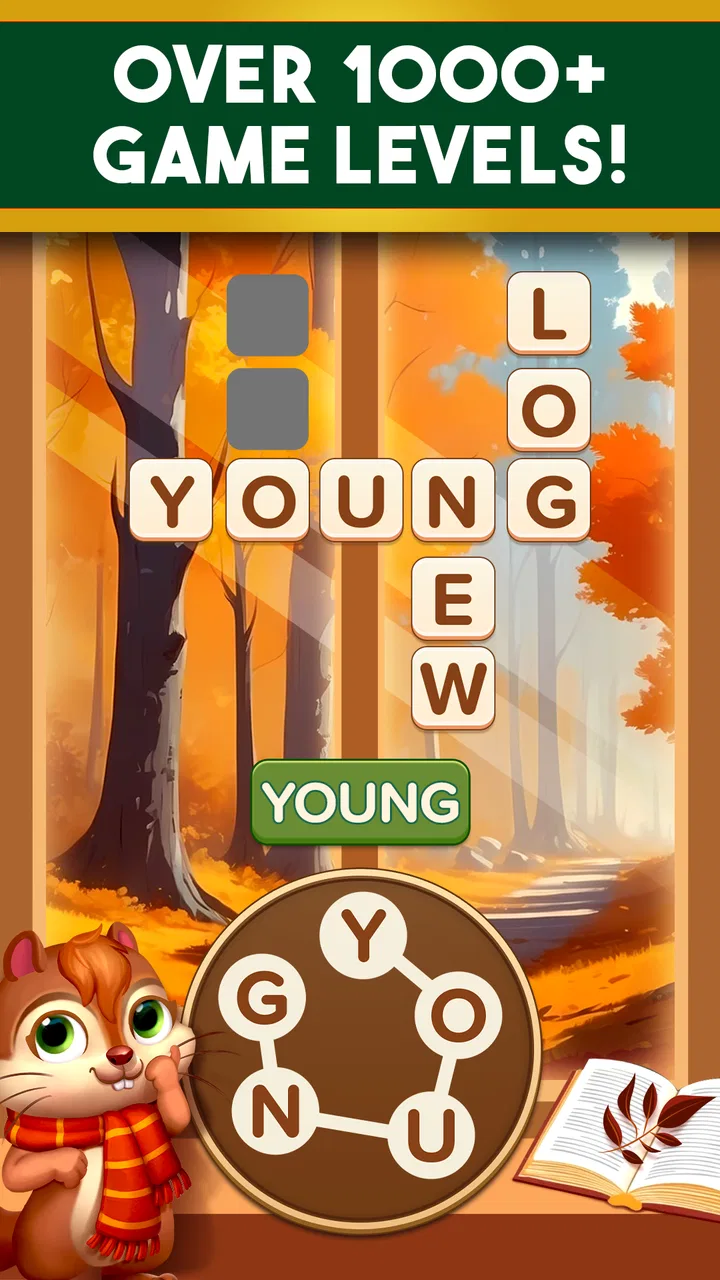
The strongest part of the experience is the basic readability of the task. I can open a puzzle and understand what I am supposed to do without studying a complicated rule set. That matters for a word game because the challenge should come from thinking about language, not from learning the interface. The familiar crossword-inspired format gives each screen a clear purpose, and the short description, “Word Nut,” accurately reflects the compact nature of the game rather than promising a large role-playing system or a sprawling adventure.
You May Also Like

 Blood Strike: 2.5 Anniversary
Blood Strike’s Loadouts Turn Every Drop Into a Tactical Gamble
A close look at Blood Strike’s custom loadouts: how fast access to signature weapons reshapes its battle royale rhythm, rewards preparation, and narrows the gap between fights.

 Pandora - Music & Podcasts
Pandora’s Music Is Easy to Start, but Harder to Recover
Pandora’s strength is its low-effort path from a seed to a station. Its weak spot is how much confidence it asks you to place in connection, setup, and quiet recovery.

 8 Ball Pool
 Is Built on Rivalries, Rematches, and Routine
A close look at the rivalries, rematches, shared routines, and unanswered safety questions that turn a quick pool match into a persistent mobile community.

 Samsung Music
’s Quiet Strength Is Playing What You Already Own
Its reach comes less from spectacle than from dependable access to a personal library. That simplicity is both the app’s strongest retention engine and its ceiling.

 AccuWeather: Weather Radar
AccuWeather Review: A Quick, Clear Forecast for Everyday Decisions
For everyday plans, the best forecast is the one you can understand quickly. AccuWeather makes rain timing, radar, and local conditions easy to act on, with a few trade-offs.

 Hill Climb Racing
Why Hill Climb Racing Still Turns Crashes Into One More Run
A tiny car, a bumpy hill and one more upgrade: Hill Climb Racing keeps resurfacing because its simple chaos makes every near-miss feel personal.
More From Our News Desk



Navigation is most comfortable when I treat the game as a sequence of small mental exercises. I do not need to prepare a long session or remember a complicated story. I can pick it up, work through a few clues or word arrangements, and put it aside. That makes it useful for a commute, a waiting room, or a coffee break, provided I am in a situation where looking at a screen is safe and appropriate.
One practical habit improved my experience: I stopped trying to solve every visible possibility in order. Instead, I looked first for the shortest or most obvious words, then used the remaining letters and spaces to narrow down the harder answers. This is especially helpful on a small phone screen, where jumping around the board can become tiring. It also turns the game into a manageable process rather than a test of whether I can instantly see the entire puzzle.
The presentation is better suited to casual reading than to people who want a highly configurable study tool. I could follow the central puzzle activity without much friction, but a player with low vision should check whether the current device display and system text settings make the letters comfortable. I would not assume that every visual element scales perfectly just because the game is simple. The game’s accessible feeling comes mainly from its familiar structure, not from a deep set of documented customization controls.
How the word format affects different abilities
Word puzzles can be surprisingly demanding in ways that are easy to overlook. The game asks me to read letters, compare possible combinations, remember partial answers, and tap accurately enough to select or enter them. For someone with dyslexia, language-processing difficulties, or limited working memory, the challenge may feel very different from the challenge intended by the puzzle designer. A player might understand the clue but struggle with the visual arrangement, or recognize the answer but lose track of which letters have already been used.
I found that slowing down helped more than guessing rapidly. I read the available letters aloud in my head, formed a few familiar words, and then checked whether the remaining spaces supported those ideas. This approach is useful for players who become overwhelmed by several possibilities at once. It also makes the game less dependent on quick visual scanning, although it does not remove the underlying language challenge.
For motor access, the experience is likely most comfortable for someone who can make repeated, reasonably precise taps. Word games generally involve frequent interaction, so players with tremors, reduced dexterity, or fatigue in the hands may find longer sessions uncomfortable. I would use a stable grip, rest the phone on a table when possible, and avoid playing one-handed if that causes accidental selections. Those are simple adjustments, but they make a noticeable difference during a difficult puzzle.
The game is not a good match for someone who needs every action to be completed through voice control or a physical keyboard. I would not choose it on the assumption that alternative input methods will work smoothly. Players who rely on accessibility tools should test the game on their own device before investing time in it, particularly if precise tapping or reading small elements is already difficult in other mobile games.
Sensory comfort also depends on the individual. A visually busy screen, frequent transitions, or sound effects can be tiring for some people even when they seem harmless to others. I paid more attention to the letters and puzzle layout than to decoration, which helped keep the experience calm, but I would still recommend checking the game in a quiet setting first if you are sensitive to movement, contrast, or unexpected audio. The absence of a complex action system is helpful, yet “simple” does not automatically mean comfortable for every sensory profile.
Playing in real situations rather than ideal ones
The most convincing use case for me was a short waiting period. I could open a puzzle while waiting for an appointment, solve a few words, and stop without feeling that I had abandoned a campaign or interrupted a multiplayer match. That kind of flexible stopping point is a real advantage over games that punish the player for leaving halfway through a level. It also works well for people who want a small mental reset instead of another stream of social media.
There is a trade-off, though. A phone game can be easy to start and still be unsuitable in certain environments. I would not play while walking, crossing a street, or handling a vehicle. Someone with attention-related difficulties may also find that “just one more puzzle” stretches a short break longer than planned. I recommend setting a personal stopping point before opening it, especially when using it during work, study, or a scheduled appointment.
It can also be a gentle shared activity. Two people can look at the same puzzle and discuss possible words, making it more collaborative than the solo format initially suggests. I like this for family use because one person can contribute vocabulary while another handles the tapping. That arrangement can reduce the pressure on a player with motor limitations, although it changes the experience from independent play into a joint activity.
For language learners, the game may offer useful exposure to common English words, but I would not treat it as a complete learning course. Solving a word does not necessarily explain its meaning, pronunciation, or grammatical use. A learner can use a dictionary alongside the game, yet that interrupts the relaxed pace. This is better viewed as vocabulary practice wrapped in a puzzle than as a structured language lesson.
Parents should also keep the Everyone rating in perspective. It indicates a broad age suitability, and the word-puzzle format is far less intense than many action games. Still, younger players may encounter vocabulary that is unfamiliar or feel frustrated when guessing does not work. I would play alongside a child at first rather than assuming that an age rating guarantees the same level of ease for every reading ability.
Where it stands beside familiar word-game alternatives
Compared with a traditional newspaper crossword, this game feels more lightweight and less formal. A newspaper puzzle can reward deep knowledge, patience, and a willingness to work through clues that depend on cultural references or wordplay. Word Nut is easier to approach when I want a direct mobile activity with less preparation. The compromise is that it does not replace the richer sense of accomplishment I get from completing a carefully constructed large crossword.
Compared with a daily word guessing game, it offers a different rhythm. A daily format creates a ritual around one central challenge, while this game is more suitable when I want to continue through multiple puzzles or play whenever I have time. That freedom is convenient, but it can also make the experience feel less distinctive. There is no single daily moment forcing me to stop and reflect; the player has to create that boundary.
Compared with a full vocabulary-learning app, the game is more entertaining and less instructional. I can engage with it without feeling as though I am completing homework, but I do not get the same deliberate progression that a lesson-based app might provide. If my main goal is spelling improvement, exam preparation, or systematic vocabulary growth, I would choose a dedicated learning tool and use this as a supplement.
Compared with word games designed around rapid competition, this is a better fit for a slower pace. I do not need to race another player or react to a countdown to enjoy the central activity. That makes it friendlier for people who become anxious under time pressure. On the other hand, competitive players may find the experience too solitary or predictable if they need leaderboards, live opponents, or a strong sense of external challenge.
Practical limits, spending, and long-term comfort
The game is free to download and play, which removes the biggest barrier to trying it. It does include in-app purchases ranging from $0.99 to $229.99 per item, so I would pay attention to purchase controls before handing the device to a child or allowing unrestricted spending. The presence of optional purchases does not automatically make the game poor value, but it does mean that “free” should be understood as free entry rather than a guarantee that every possible convenience will cost nothing.
My advice is to decide in advance whether you are willing to spend anything. If you are happy to play patiently, there is no reason to treat paid options as part of the basic requirement for testing the game. If you dislike any pressure toward optional purchases, the store and device settings deserve a quick check before regular use. This is particularly important in a shared family environment where a child may tap through a prompt without understanding the financial consequence.
Another limitation is the natural ceiling of a focused word-game format. Once I had become familiar with the way puzzles were presented, the surprise came less from learning new mechanics and more from finding the right words. That is not a flaw for someone who wants a dependable routine, but it may disappoint players who need constant novelty. I would choose it for repeatable mental exercise, not for a continually changing world with new systems to master.
The current version is 2.010 and it supports devices running Android 7.0 or later. That makes compatibility worth checking before installation, especially if you use an older phone or tablet. On a supported device, the main question is less about technical ambition and more about comfort: screen size, touch responsiveness, text clarity, and how long you can play without eye or hand fatigue.
The game has built a substantial audience, with over five million installs and an average rating of 4.8 from around one hundred forty-eight thousand ratings. Those figures suggest that the basic format works for many people, but they should not replace personal testing. A popular word game can still be wrong for someone who needs large controls, advanced audio descriptions, no purchase prompts, or a more educational structure.
A thoughtful choice for relaxed word practice
After spending time with it, I see this as a friendly, low-pressure word game rather than a complete accessibility solution or a serious language-learning platform. Its best quality is the clear, familiar puzzle loop: I can start quickly, think at my own pace, and stop without a complicated commitment. The Everyone rating and free entry make it easy to recommend as a first experiment for families and casual players, while the crossword style gives it more mental substance than a purely reflex-based time filler.
I would recommend it to someone who enjoys forming words, wants an activity for short breaks, and prefers puzzles that can be approached without competition. I would also recommend trying shared play if precise tapping is tiring, or using a larger supported screen if the phone layout feels cramped. These small changes can make the game more welcoming without pretending that they solve every access issue.
I would skip it if you require strong text customization, dependable alternative input, structured lessons, or a completely purchase-free environment. A newspaper crossword may be better for depth, a language app for deliberate study, and a competitive word title for social energy. For everyone else, the best reason to try Word Nut is its balance between easy entry and genuine mental effort. It is not revolutionary, but it is comfortable, useful in everyday gaps, and straightforward enough to become a pleasant part of a casual puzzle routine.
Super Free has kept the focus on a familiar activity that does not demand fast reactions or a large time investment. In my experience, that makes it especially suitable when I want to exercise my vocabulary without turning relaxation into a test of speed. Just approach it with realistic expectations, check the screen and controls on your own device, and remember that a simple word puzzle can still present real reading, motor, and sensory barriers for some players.
FAQs for Word Nut - Word Puzzle Games
01What is Word Nut - Word Puzzle Games?
Word Nut - Word Puzzle Games is an engaging word puzzle app that challenges players to form words from given letters. It offers various levels of difficulty, ensuring that both beginners and seasoned word puzzle enthusiasts can enjoy the game. With its intuitive interface and educational benefits, it’s a great choice for word game lovers.
02Is Word Nut suitable for all age groups?
Yes, Word Nut is designed to be family-friendly and can be enjoyed by players of all ages. The game features varying levels of difficulty, allowing kids, teens, and adults to play at their own pace and skill level. It's a fantastic way to improve vocabulary and cognitive skills while having fun.
03Are there in-app purchases in Word Nut?
Word Nut offers optional in-app purchases that can enhance the gaming experience. Players can buy hints or additional levels to progress faster. However, the game is fully playable without any purchases, and players can choose to enjoy the free version without spending any money.
04Does Word Nut require an internet connection to play?
No, Word Nut can be played offline, making it a perfect companion for commutes or areas with limited internet access. However, certain features like leaderboards or daily challenges may require an internet connection to sync and update scores and progress.
05How can I troubleshoot issues with Word Nut?
If you encounter issues with Word Nut, try restarting the app or your device. Ensure that you have the latest version installed from the App Store or Google Play. If problems persist, check for any device updates or contact customer support for further assistance. They are usually responsive and helpful in resolving any issues.
Pros
- Engaging puzzles that enhance vocabulary.
- Intuitive interface with easy navigation.
- Regular updates with new challenges.
- Offline mode available for on-the-go play.
- Variety of levels for different skills.
Cons
- Ads can be intrusive during gameplay.
- In-app purchases can be costly.
- Limited hints without purchase.
- Repetitive levels may bore advanced users.
- Occasional lag on older devices.

Word Nut - Word Puzzle Games
Gallery